PDF export
Download a signed timesheet of your own logged hours.
From the three-dots menu on the audit / My Time tab, choose Export to PDF to download a Proof of Work — a one-page timesheet of the caller's own worklogs and internal-activity entries for the current filter (date range or sprint), with a summary, a per-issue breakdown, and a signature line. The PDF is generated server-side with pdf-lib and delivered as a single-use download.
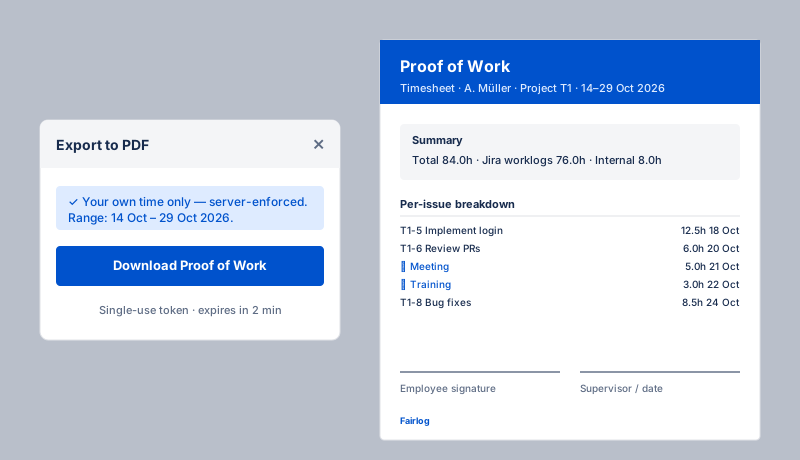
What's in the PDF
- Header — the user's name, the project, and the date range or sprint name.
- Summary — total hours, split by Jira worklogs vs. internal-activity categories.
- Per-issue breakdown — issue key, summary, hours and date for each worklog; internal entries grouped by category.
- Footer — the Fairlog logo and a signature/date line for a supervisor counter-signature.
Languages & fonts
The PDF is generated in the caller's selected UI language. A Noto Sans subset (Latin + Cyrillic + Greek) is embedded into the PDF for any non-Latin locale so accented and Cyrillic text render correctly without relying on the viewer's installed fonts.
Access
The PDF export is self-service: the server always scopes the export to your own account, so the timesheet only ever contains your own time — even when an auditor opens the menu. The download uses a short-lived, single-use token bound to you, so the PDF can only be fetched once, within a couple of minutes, by you.