Audit log
Every change to a worklog or internal time entry is recorded, immutable, and exportable.
Fairlog keeps an append-only audit log of every mutation that touches a worklog or an internal-activity entry — create, update, delete — plus selected settings changes. Each entry is stored once, never edited, and kept indefinitely. Auditors can browse the log on the audit tab and export it to CSV for compliance.
What gets logged
| Action | What it records |
|---|---|
| Worklog create | The new worklog's author, issue, started time, hours, and the actor's account ID + display name. |
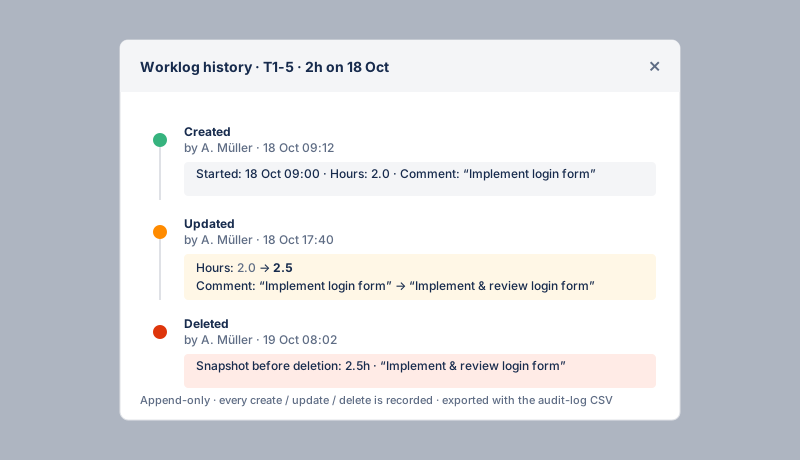
| Worklog update | Before and after values of every changed field (started, hours, comment). The actor and timestamp are recorded. |
| Worklog delete | The full worklog as it was just before deletion, plus the actor. |
| Internal entry create / update / delete | The same fields for internal-activity entries (category, started, hours, comment), with before/after on update. |
| Settings & internal-activities edits | Selected configuration changes (thresholds, category definitions, working-hours schedules) so the log explains why the audit view changed shape over time. |
Browsing the log
On the audit tab, the Activity analytics tab shows a donut of recent mutations grouped by editor, with a clickable legend that drills into each editor's events. Below the audit table, each worklog row has a drill-down that opens a modal with that worklog's full timeline — every create / update / delete event in order, with a compact before→after diff for each field.
Export to CSV
The three-dots menu on the audit tab has an Export audit log (CSV) action. The export checks auditor access and binds the project + date range to a short-lived, single-use download token, so the CSV can only be fetched once, within a couple of minutes, by an auditor. Auditors only.