Settings
Per-project tuning, project-admin only.
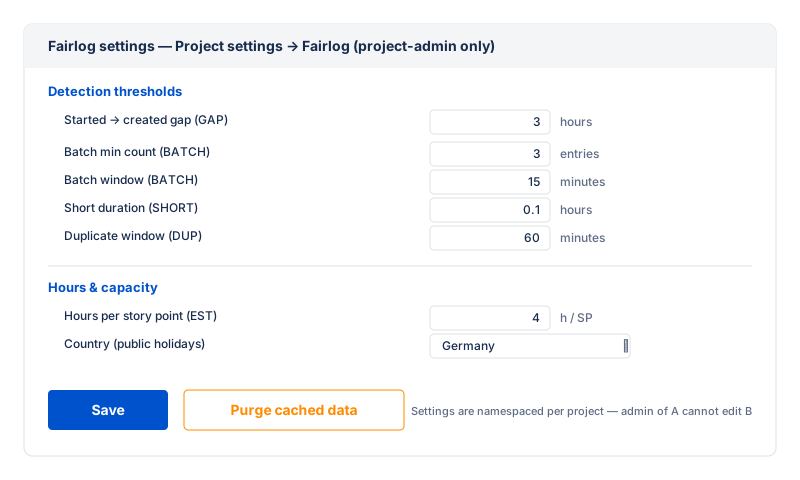
The settings page lives at Project settings → Fairlog
and is visible only to project admins (Jira site admins and users with
the ADMINISTER_PROJECTS permission). Every field is
per-project — a project admin of project A cannot change project B's
config.
1. Thresholds section
Tune the sensitivity of the suspicion flags. Each field has an inline explanation and example on the page.
| Field | Default | What it controls |
|---|---|---|
| Gap threshold (hours) | 3 |
Flag a worklog created more than this many hours after its claimed start. Lower → catch more late-created entries. |
| Batch minimum count | 3 |
Flag a cluster of this many or more worklogs by the same author, created within the batch window. |
| Batch window (minutes) | 15 |
Consecutive worklogs must be within this many minutes of each other to count as one cluster. |
| Minimum hours per entry | 0.1 |
Flag a worklog shorter than this many hours — the SHORT signal. 0.1h = 6 minutes. |
| Duplicate window (minutes) | 60 |
Flag a later worklog with the same author, issue and duration as one created within this window — the DUP signal. |
| Outlier multiplier | 4 |
Flag a worklog whose duration is more than N× the author's median entry length — the OUTLIER signal. |
2. Estimate section
| Field | Default | What it controls |
|---|---|---|
| Hours per story point | empty | How many hours one story point is worth for this project.
Fairlog computes expectedHours = storyPoints ×
hoursPerStoryPoint and flags an issue when actual logged
hours are more than 1.5× above or below that. Leave
empty to skip the estimate check. |
hoursPerStoryPoint value rather than expecting a
configurable ratio.
3. Internal activities section
Define the set of internal-activity categories for this project (see
Internal activities). Each
category has a name, a colour, an optional period limit
(maxHoursPerPeriod), and an enforce mode (hard = block the
write over the cap; soft = allow but flag the row). Colour is decoupled
from the log records, so renaming a category never rewrites history.
4. Working hours section
Set the default weekly schedule (hours per day Mon–Sun) for the project, and per-member overrides for part-timers or non-standard patterns. The schedule feeds the Team capacity baseline. See Working hours & holidays.
5. Holidays section
Seed the public holidays for the team's country and year (via the Nager.Date API), and add or remove individual dates. Holiday dates are project-scoped and reduce each member's expected hours on a working day. See Working hours & holidays.
6. Data section (Erase all data)
The "Erase all data" action clears this project's Fairlog settings, cached insights, capacity cache and audit log. The cache regenerates on the next view. This does not delete worklogs in Jira — only Fairlog's stored config, cache and audit log for this project.
The action asks for confirmation before erasing. It cannot be undone.
Who can see this page
- Project admins (Jira site admins, or users with
the
ADMINISTER_PROJECTSpermission for the project) — full access to all sections. - Everyone else — the page is hidden from the project settings sidebar. Even if a non-admin reached the URL directly, the the server re-checks admin access on every save and refuse.
Auditor access (the Time Auditor permission) is a separate permission and does not grant access to this settings page. See Permissions.
Defaults reference
Internal setting keys, for admins who configure Fairlog programmatically or via the storage editor.
| Setting | Default |
|---|---|
gapThresholdHours | 3 |
batchMinCount | 3 |
batchWindowMinutes | 15 |
minHoursThreshold | 0.1 |
duplicateWindowMinutes | 60 |
outlierMultiplier | 4 |
mismatchStatusNames |
['To Do', 'Backlog', 'Done', 'Closed'] (not exposed
in the UI) |
hoursPerStoryPoint | empty (skip check) |