Privacy & data handling
30-minute cache. Project-admin erasure. One external egress to a public holiday API. Everything else stays in Atlassian.
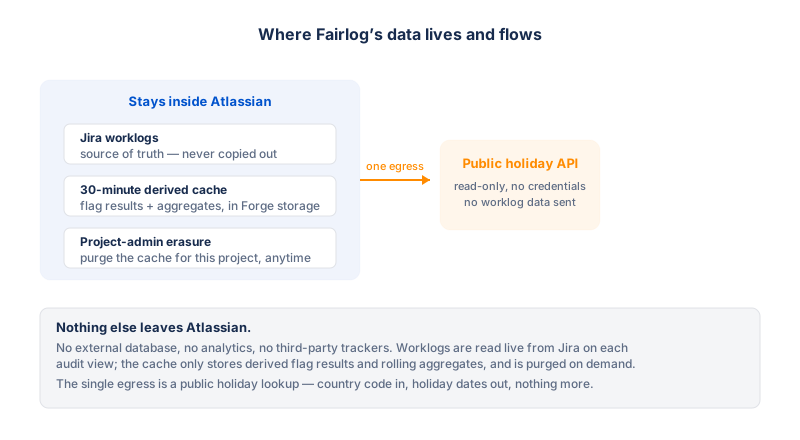
This page summarizes how Fairlog handles personal data. The full authoritative document is the Privacy Policy linked from the Marketplace listing — this is the operator-facing version with more detail on the storage internals.
What personal data Fairlog processes
- Worklog author identifiers — Jira account IDs of users who logged time on issues in the projects you audit.
- Display names — the names Jira associates with those account IDs, shown in the audit table and member filter.
- Avatar URLs — fetched from Jira for the round member-filter avatars.
- Worklog content — the start time, creation timestamp, duration, and any comment text attached to a worklog entry.
- Issue keys and statuses — the issues the worklogs belong to and their current status.
Fairlog does not collect or process passwords, payment information (handled by Atlassian Marketplace), or any data from outside the Jira instance it is installed on.
Where data is stored
All data is processed and stored within Atlassian's Forge
infrastructure (Key-Value Store and compute). The app makes
no calls to any external host — no analytics services,
no telemetry, no third-party APIs. Every API call goes to the Jira
Cloud instance the app is installed on, via Atlassian's Forge
requestJira SDK.
| What | Where | How long |
|---|---|---|
| Insights cache (author IDs, display names, worklog details, comment text) | Forge Key-Value Store, per project + filter | 30 minutes (automatic expiry). Self-service views bypass the cache entirely. |
| Export tokens (account ID + export scope) | Forge Key-Value Store | 2 minutes, deleted on first use (one-shot). |
| Per-project settings (thresholds, hours-per-story-point) | Forge Key-Value Store | Until a project admin clears or erases them. Contains no personal data. |
No personal data is stored permanently. Display names, account IDs, and worklog content exist only in the 30-minute cache. The per-project settings contain only numeric thresholds and a story-point ratio — no personal data.
How the data is used
Exclusively to:
- Display worklog entries in the audit and self-service views.
- Flag entries that match configurable suspicion patterns.
- Generate CSV exports of the current view for auditors.
Fairlog does not use the data for advertising, profiling, training models, or any purpose unrelated to its functionality.
Data sharing
Fairlog does not share any data with third parties. The data never leaves Atlassian's infrastructure. There are no sub-processors beyond Atlassian.
This documentation website (cookies & local storage)
This static documentation site does not use cookies and does not track you. It has no analytics, no advertising, and no third-party scripts.
The only thing the site stores is the language you choose in the language switcher, so the site stays in that language as you move between pages. The choice is kept in two places, both entirely inside your own browser:
- Local storage (
fairlog-docs-lang) — used when the site is served over http(s), so the choice survives a return visit. - The page URL (
?lang=…) — carries the choice across pages on every origin, including when you open the HTML files directly from disk (file://), where a browser gives each page its own separate local storage.
Neither of these is sent to any server. They are a functional preference that you set yourself, which is the "strictly necessary for the service requested by the user" case under the ePrivacy Directive (Art. 5(3)) and Art. 6(1)(b) GDPR — so the site does not ask for your consent and does not show a cookie banner. To clear the preference, remove the site's local-storage entry in your browser's site-data settings, or simply switch the language back to English.
Your rights (GDPR & similar)
Because no personal data is stored permanently, exercising your right to erasure is straightforward:
- The 30-minute cache expires automatically — your data is gone within 30 minutes of the last time the cache was written for you.
- A project admin can click Erase all data on the Fairlog settings page to clear the cache immediately for a project.
- Uninstalling the app schedules all its KVS data for deletion by the Forge platform.
To request erasure, ask a project admin of any project you appear in to use the Erase action, or uninstall the app.
Security
Fairlog runs entirely within Atlassian's Forge sandbox. It has no access to secrets, no ability to make outbound network calls except to the Jira instance it is installed on, and no filesystem. All data in transit uses HTTPS. Access to the audit view is enforced server-side on every API call — not just hidden in the UI.
International transfers
Fairlog stores data in Atlassian's Forge infrastructure. Atlassian's data residency and transfer practices are governed by Atlassian's own policies. The app itself makes no transfers — all data stays within the Forge environment.
Scope justifications
| Scope | Why Fairlog needs it |
|---|---|
read:jira-work |
Reads worklogs and issue metadata to detect suspicious time entries (the app's core feature). |
read:jira-user |
Resolves worklog author account IDs to display names for the member filter and Worker column. |
storage:app |
Stores per-project settings, a 30-minute insights cache, and one-shot export tokens in Forge KVS. |
read:project:jira |
Lists assignable project members for the audit tab's member filter. |
read:board-scope:jira-software |
Maps Scrum boards to sprints for sprint-mode filtering. |
read:sprint:jira-software |
Lists sprints for the sprint picker. |
read:issue-details:jira |
Reads sprint membership directly (the sprint-issues endpoint) instead of the laggy search index, so freshly-added issues appear immediately. |
read:jql:jira |
Searches issues by updated >= date for
range-mode filtering. |