Working hours & holidays
Per-member weekly schedules and public-holiday schemes that drive capacity baselines.
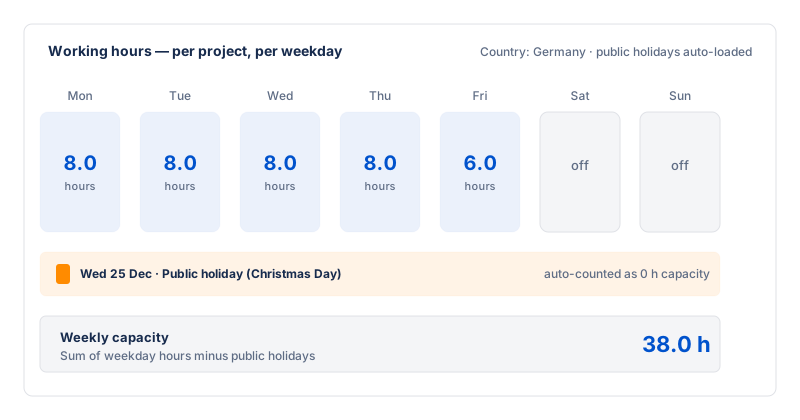
To turn "hours logged" into a real utilization number,
Fairlog needs to know how many hours each member is
supposed to work. The Working hours editor
(on the settings page) captures a weekly schedule per member, and the
Holidays editor captures the public-holiday scheme for
the team's country. Together they produce the
expectedHours baseline used by the
Team capacity view and the
outliers signal.
Weekly schedule per member
Each member has a row of seven day-cells (Mon–Sun). For each working
day you set the number of hours (e.g. 8); non-working days
are left at 0. A default schedule is set project-wide and
each member can have a personal override (part-time, different days).
Override visibility is admin-only — a member sees their own schedule but
not anyone else's.
| Field | Default | What it controls |
|---|---|---|
| Default weekly hours | Mon–Fri 8h, Sat–Sun 0h | The baseline schedule applied to every member who has no personal override. |
| Per-member override | none (inherits default) | A member-specific seven-day schedule. Set for part-timers or anyone on a non-standard pattern. |
Public holidays
The Holidays editor lets a project admin seed the public holidays for the team's country and year. Seeding calls the public Nager.Date API (only a country code and year are sent — no end-user data, and the request is registered as out-of-EU-scope for residency). The returned dates are stored by Fairlog so the capacity math works without re-calling the API.
- Seed holidays — pick a country and year, the editor fetches and stores the dates.
- Edit — add a one-off company holiday (e.g. a bridge day) or remove a date that doesn't apply.
How the baseline is computed
For a date range, each member's expectedHours is the sum
of their weekly schedule over the days in the range, minus any
holiday dates that fall on a working day. The
Team capacity view compares this expected
total against the member's logged hours to produce a utilization
percentage and an over/on/under-target zone.