The eight flags
What Fairlog flags, how it detects each one, and the defaults.
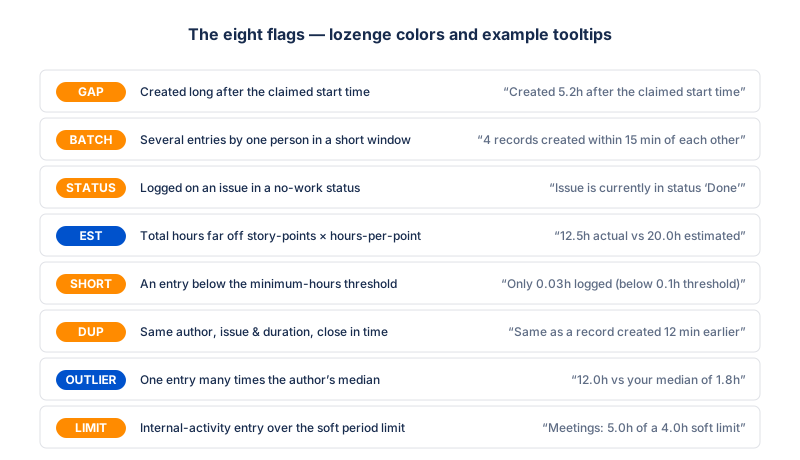
Every flag is a colored lozenge in the table's Flags column. Hover a lozenge to see the detail in a tooltip — there is no separate legend section. The eight flag types:
GAP BATCH STATUS EST SHORT DUP OUTLIER LIMIT
| Flag | Lozenge color | What it catches |
|---|---|---|
gap |
warn (orange) | Worklog created long after the work was claimed to start. |
batch |
warn (orange) | Several worklogs by the same person created within a short window. |
status_mismatch |
warn (orange) | Worklog on an issue currently in a status where no work should happen. |
estimate_mismatch |
info (blue) | Total hours logged far off from story points × hours-per-story-point. |
short_duration |
warn (orange) | A worklog shorter than a minimum-hours threshold — "punched the clock for appearances". |
duplicate |
warn (orange) | Same author, same issue, same duration, created within a short window of an earlier entry. |
outliers |
info (blue) | A worklog whose duration is many times the author's median entry length. |
internal_period_limit |
warn (orange) | Internal-activity entry that pushes a user over the soft period limit for its category. |
The per-flag detail below is for project admins who want to understand or tune the rules. As an auditor you only need the table above and each lozenge's tooltip.
1. Started → created gap GAP
What it catches: a worklog whose
created timestamp is much later than its
started timestamp — the person did the work on Monday but
added the entry on Friday, often a sign of reconstructing time from
memory at the end of the week.
How it's detected:
gapHours = (created - started) / 3600000
if (gapHours > settings.gapThresholdHours) flag()
Default threshold: gapThresholdHours = 3
— flag any worklog created more than 3 hours after its claimed start
time.
Example tooltip: "Created 5.2h after the claimed start time".
2. Batch creation BATCH
What it catches: several worklogs by the same person, across different issues, created within a short window of each other — looks like "logged everything at once at the end of the week".
How it's detected: group worklogs by author, sort
each group by created, then find clusters where consecutive
entries are within batchWindowMinutes of each other and the
cluster size is at least batchMinCount.
Default thresholds:
batchMinCount = 3— flag a cluster of 3 or more.batchWindowMinutes = 15— consecutive entries must be within 15 minutes of each other to count as one cluster.
Example tooltip: "4 records created within 15 min of each other".
3. Status mismatch STATUS
What it catches: a worklog on an issue currently in a status where no work should be happening (e.g. Done or Backlog). Often a sign of late-added time on closed work, or time moved into an issue that was never started.
How it's detected: compare the issue's current status against a configurable list of "no-work" statuses. Jira doesn't expose "the status at the time of logging" without reading the issue changelog, so Fairlog uses the current status — be aware that moving an issue from In Progress to Done after logging will cause its worklogs to flag retroactively.
Default statuses:
['To Do', 'Backlog', 'Done', 'Closed'].
Example tooltip: "Issue is currently in status "Done"".
4. Estimate mismatch EST
What it catches: an issue where the total hours logged is far off from the expected hours based on story points — either much more or much less than the estimate implied. Often a sign of bad estimation, scope creep, or misattributed time.
How it's detected: computed at the issue level (sum of all its worklogs), not per individual worklog.
expectedHours = storyPoints * hoursPerStoryPoint
actualHours   = sum(worklog.timeSpentSeconds) / 3600
ratio         = actualHours / expectedHours
if (ratio > 1.5 || ratio < 0.5) flag()
Threshold: more than 1.5× above or below the expected hours. The threshold is fixed (not configurable) and deliberately loose — it's a hint, not an alarm.
Default hoursPerStoryPoint: empty —
the check is skipped for any project that hasn't set a
value. Set it on the settings page to
enable.
Example tooltip: "12.5h actual vs 20.0h estimated (5 SP × 4h)".
5. Short duration SHORT
What it catches: a worklog shorter than a
minimum-hours threshold — looks like "punched the clock for appearances"
(a 2-minute entry so the day shows activity, for example). The default
of 0.1h (6 minutes) is deliberately very low, so this only
fires on genuinely tiny entries, not on a normal short standup log.
How it's detected: a per-worklog check against
minHoursThreshold.
Default threshold: minHoursThreshold = 0.1
(6 minutes).
Example tooltip: "Only 0.03h logged (below 0.1h threshold)".
6. Duplicate DUP
What it catches: a worklog with the same author, the
same issue, and the same timeSpentSeconds as an earlier
entry, created within a short window — a classic accidental
double-log (the person clicks "log 2h" twice by mistake, or the Jira
client retries).
How it's detected: group by
authorAccountId::issueKey::timeSpentSeconds, then flag the
later record in each pair whose created timestamps
are within duplicateWindowMinutes of each other.
Default threshold:
duplicateWindowMinutes = 60.
Example tooltip: "Same author, issue, and duration as a record created 12 min earlier".
7. Outlier OUTLIER
What it catches: a single worklog whose duration is many times the author's median worklog length — a 12h entry when the same person normally logs 1–2h. The median (not the mean) is used so one huge entry doesn't drag the baseline up and hide itself.
How it's detected: per author, compute the median
of all their worklog durations in the current view, then flag any entry
whose duration is more than outlierMultiplier× that median.
A median needs at least two entries, so authors with a single worklog
are never flagged.
Default threshold: outlierMultiplier = 4
— flag anything 4× longer than the author's typical entry.
Example tooltip: "12.0h is 4× the author's median of 3.0h".
8. Internal period limit LIMIT
What it catches: an internal-activity entry that pushes a user's running total for its category over the soft period limit set for that category. The rows that cross the cap (and every entry after them in the period) carry this flag.
How it's detected: for each
(author, category) pair whose category is in soft
mode (enforceLimit = false and
maxHoursPerPeriod > 0), the user's full period logs are
sorted by started, accumulated, and every record past the
cap is flagged. The flag is computed against the true period
total (read from Forge storage), so a week view that overlaps a month
boundary still computes the month's real total.
Hard vs soft: in hard mode the API blocks the write before it ever reaches the table, so over-limit rows can't exist and this flag never fires — it only applies to soft-limit categories, where the entry is allowed but flagged for the auditor.
Example tooltip: "Training over period limit: 24h / 20h".
Tuning the thresholds
Six of the eight flags have configurable thresholds on the
per-project settings page:
gapThresholdHours, batchMinCount,
batchWindowMinutes, minHoursThreshold,
duplicateWindowMinutes, outlierMultiplier, and
hoursPerStoryPoint. The estimate-mismatch ratio (1.5×) and
the status-mismatch list are not exposed in the UI. Lower a threshold to
catch more (and more false positives); raise it to stay quiet. The
defaults are deliberately conservative — Fairlog prefers to miss
suspicious entries over flagging innocent ones.