Internal activities
Log meetings, training and other non-issue time, with per-category limits and colours.
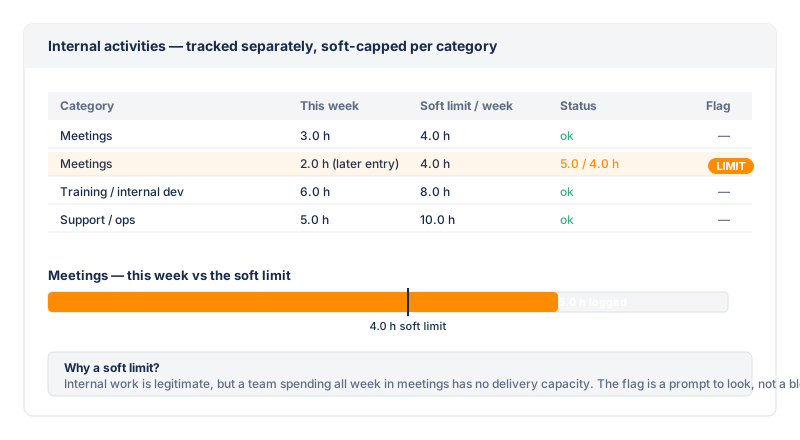
Not all work happens on a Jira issue. Meetings, training, admin and other "internal" time still need to be accounted for so the Team capacity view reflects reality. Internal activities let any logged-in user log time against a category instead of an issue, and the entries appear in the My Time and audit view tables alongside regular worklogs — flagged with a coloured lozenge so they're easy to tell apart.
Categories
A project admin defines the set of internal-activity categories on the settings page. Each category has:
- Name — e.g. "Meeting", "Training", "Admin".
- Colour — the lozenge colour used to mark entries of this category in the tables. Colour is decoupled from the log records, so renaming a category never rewrites history.
- Period limit — an optional
maxHoursPerPeriodcap per period (week or month). - Enforce mode — hard (the API blocks the write over the cap) or soft (the entry is allowed but the row is flagged with the LIMIT flag for the auditor).
Logging internal time
Any logged-in user opens the audit / My Time tab, picks Log internal time, and chooses a category, a date, hours and optional comment. The entry is stored by Fairlog (not as a Jira worklog — there is no issue), and is scoped to your own account. Like worklogs, internal entries can be edited or deleted by their own author only; every mutation is recorded in the audit log.
The LIMIT flag
For soft-limit categories, the LIMIT flag marks the rows that push a user's running period total over the cap. The flag is computed against the user's true period total (read from storage), so a week view that overlaps a month boundary still computes the month's real total. In hard mode the write is blocked before it reaches the table, so over-limit rows can't exist and the flag never fires. See the flags page for the full detection rule.
gap,
status_mismatch, estimate_mismatch,
batch, duplicate, outliers,
short_duration) because they have no Jira issue and their
created equals started by construction. Only
the period-limit signal applies to them.