Support
How to get help, and answers to the most common questions.
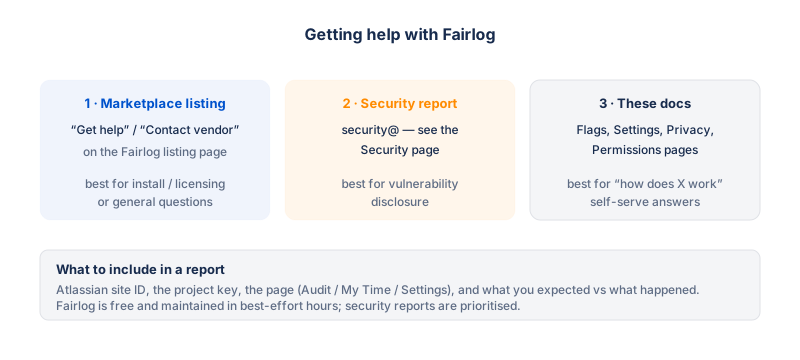
Contact
| Channel | Where |
|---|---|
| Support email | The email listed on the Fairlog Marketplace listing page. |
| Contact form | The Support URL listed on the Fairlog Marketplace listing page. |
| Documentation | This site — Fairlog documentation home. |
When you contact support, please include:
- Your Jira site URL (e.g.
your-domain.atlassian.net). - The project key where you're seeing the issue (e.g.
PROJ). - A screenshot of what you're seeing, if applicable.
- What you expected to happen, and what happened instead.
Frequently asked questions
Why can't I see the Worker or Flags columns?
Because you don't have the Time Auditor project permission in the project you're viewing. Without it, you get the self-service My Time view (your own worklogs only, no flags). Ask a project admin to grant you the Time Auditor permission — see Permissions.
How do I add an auditor?
Auditor access is granted through Jira's standard permission system, not through Fairlog. A project admin goes to Project settings → Permissions → Time tracking → Time Auditor and grants the permission to a project role or group. See Permissions for step-by-step.
Site admin here — why don't I see flags in some projects?
Site admins are always auditors in every project, so you should see the full audit view everywhere. If you don't, check that:
- You're signed in as the site admin account (not a regular user account on the same site).
- The project actually has worklogs in the date range or sprint you picked — Fairlog can only flag entries that exist.
- Your thresholds aren't set so high that nothing triggers. The
defaults are conservative; try lowering
gapThresholdHourstemporarily to see if entries appear.
Does Fairlog work with Jira Server or Data Center?
No. Fairlog is a Forge app for Jira Cloud only. It uses the Forge
platform (Key-Value Store, compute, the Forge requestJira
SDK), which is cloud-only. There is no Server or Data Center
version.
Is my data sent anywhere outside Atlassian?
No. Fairlog makes no calls to any external host — no analytics, no telemetry, no third-party APIs. Every API call goes to the Jira instance the app is installed on. All storage is in Atlassian's Forge Key-Value Store. See Privacy.
How long is my data kept?
Personal data (display names, account IDs, worklog content) is cached for at most 30 minutes and never stored permanently. Per-project settings (thresholds, hours-per-story-point) persist until a project admin clears them, but those contain no personal data. See Privacy.
How do I erase all data for a project?
A project admin opens Project settings → Fairlog and clicks Erase all data. This clears the project's Fairlog settings and cached insights. It does not delete worklogs in Jira. See Settings.
How do I erase my own personal data (GDPR)?
Ask a project admin of any project you appear in to use the Erase all data action. The 30-minute cache expires automatically anyway, so your data is gone within 30 minutes of the last cache write. See Privacy.
Why does a flag appear on a worklog that was fine before?
The status mismatch flag uses the issue's current status, not the status at the time of logging (Jira doesn't expose that without reading the issue changelog). If an issue was In Progress when the work was logged and has since been moved to Done, its worklogs will flag retroactively. This is expected; it's a side-effect of using the current status.
The export CSV is empty / missing rows. Why?
Check:
- The member filter — if a single person is selected, only their worklogs are exported. Click the avatar again to clear the filter and export the whole team.
- The date range / sprint — worklogs outside the selected range aren't included.
- The export token is single-use and expires after 2 minutes. If you let it expire before the download finishes, click Export again.
Can I change the flag colors / add my own flags?
Not in the current version. The four flag types and their colors are fixed. Thresholds for three of them (gap, batch, status) are configurable on the settings page; the estimate-mismatch ratio (1.5×) is fixed. If you need custom flags for your workflow, let us know — it's on the roadmap for a future edition.
What languages does Fairlog support?
The UI is fully translated into every locale the Forge platform supports — currently 26 languages. The viewer's Jira locale is picked up automatically. There's no setup; if your Jira is in French, Fairlog is in French.